

PC36 Creator Compact One | Ryzen 7 5700X + RTX 5060 8GB + 32GB DDR4 | Creator PC | PC36
PC36 Creator Compact One | Ryzen 7 5700X + RTX 5060 8GB + 32GB DDR4 | Creator PC | PC36
- Optimised spec
- Built by experts
- Triple-safe Shipping
Customise with the dropdown menu
🎨 PC36 Creator Compact One
The Studio One workflow, in a case that fits beside the monitor
Creator Compact One is what happens when you take a capable editing machine and refuse to give anything up to make it small. It is the compact sibling of Creator Studio One and runs the same core parts: eight Zen 3 cores, 32GB of memory and an RTX 5060 doing the encoding. The difference is the box it lives in and the board underneath, not the work it can get through.
In practice that means 1080p timelines that scrub without proxies, 4K footage you can cut and colour with a bit of patience on the heaviest effects, Lightroom catalogues that stay responsive, and Photoshop files with plenty of layers that do not stall every time you move a mask. Exports lean on the RTX 5060 hardware encoder, so an hour-long 1080p cut goes out in minutes rather than the length of a lunch break. The RTX 5060 also brings CUDA, which is the practical reason it is here: After Effects, Resolve and the AI-assisted tools in the Adobe apps all want it.
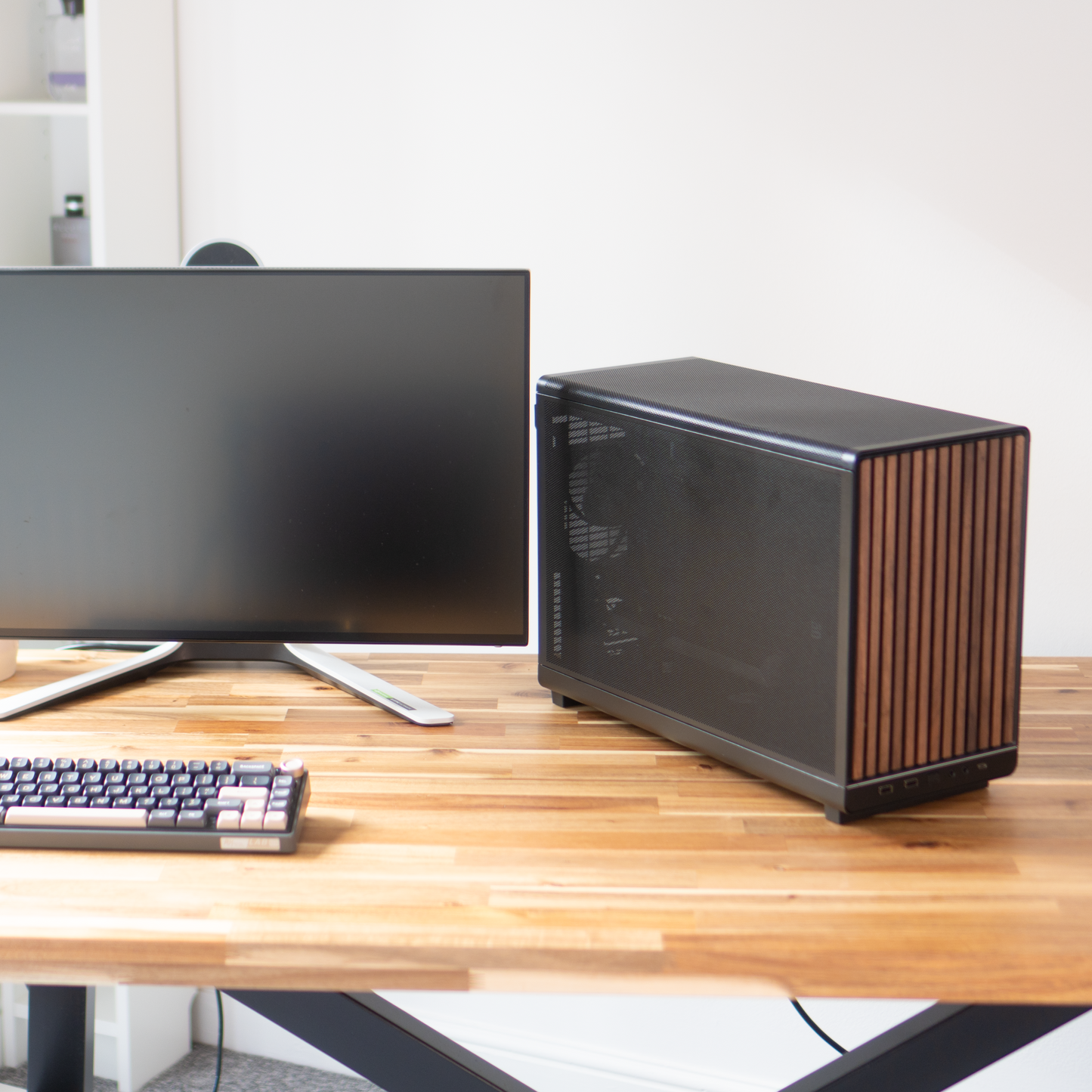
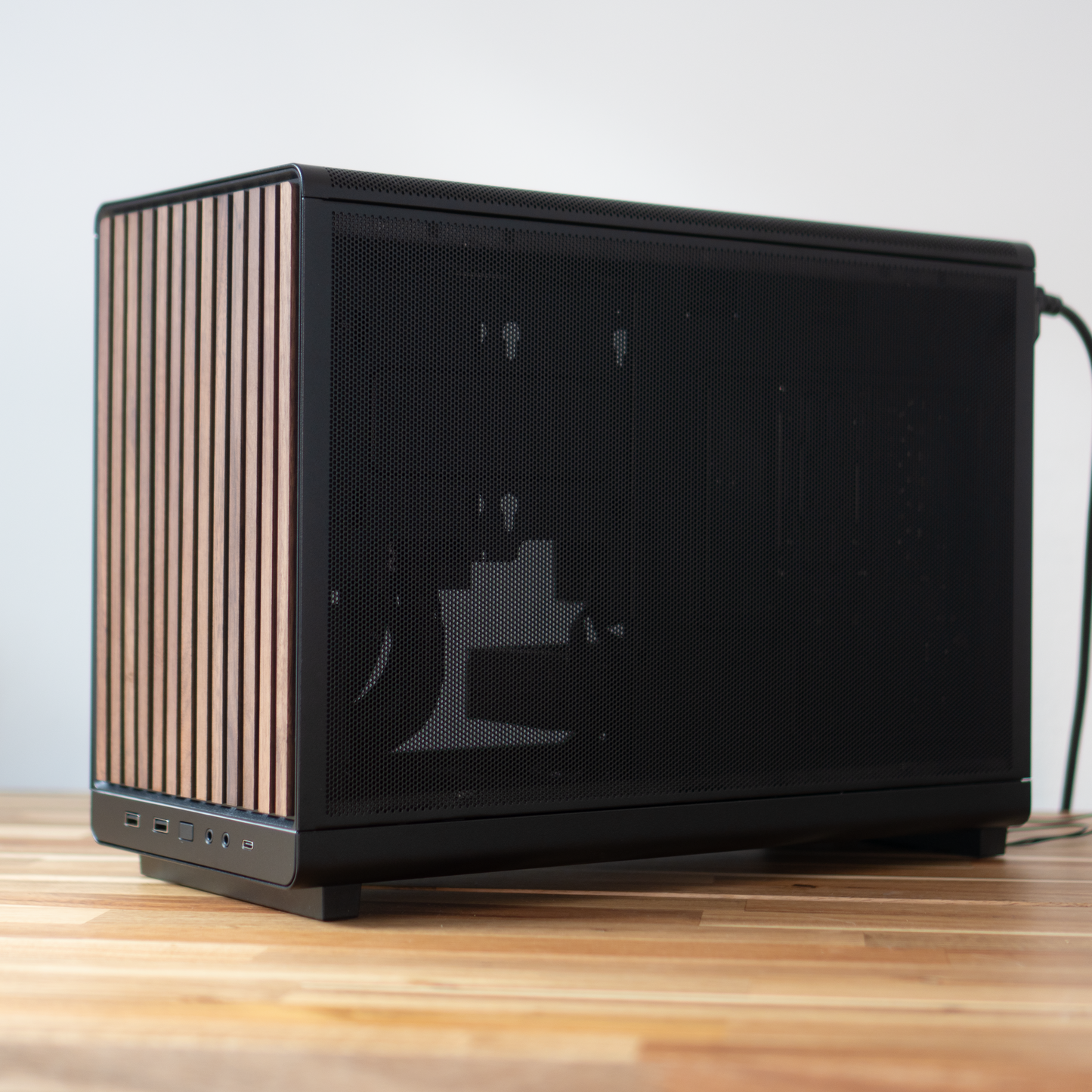
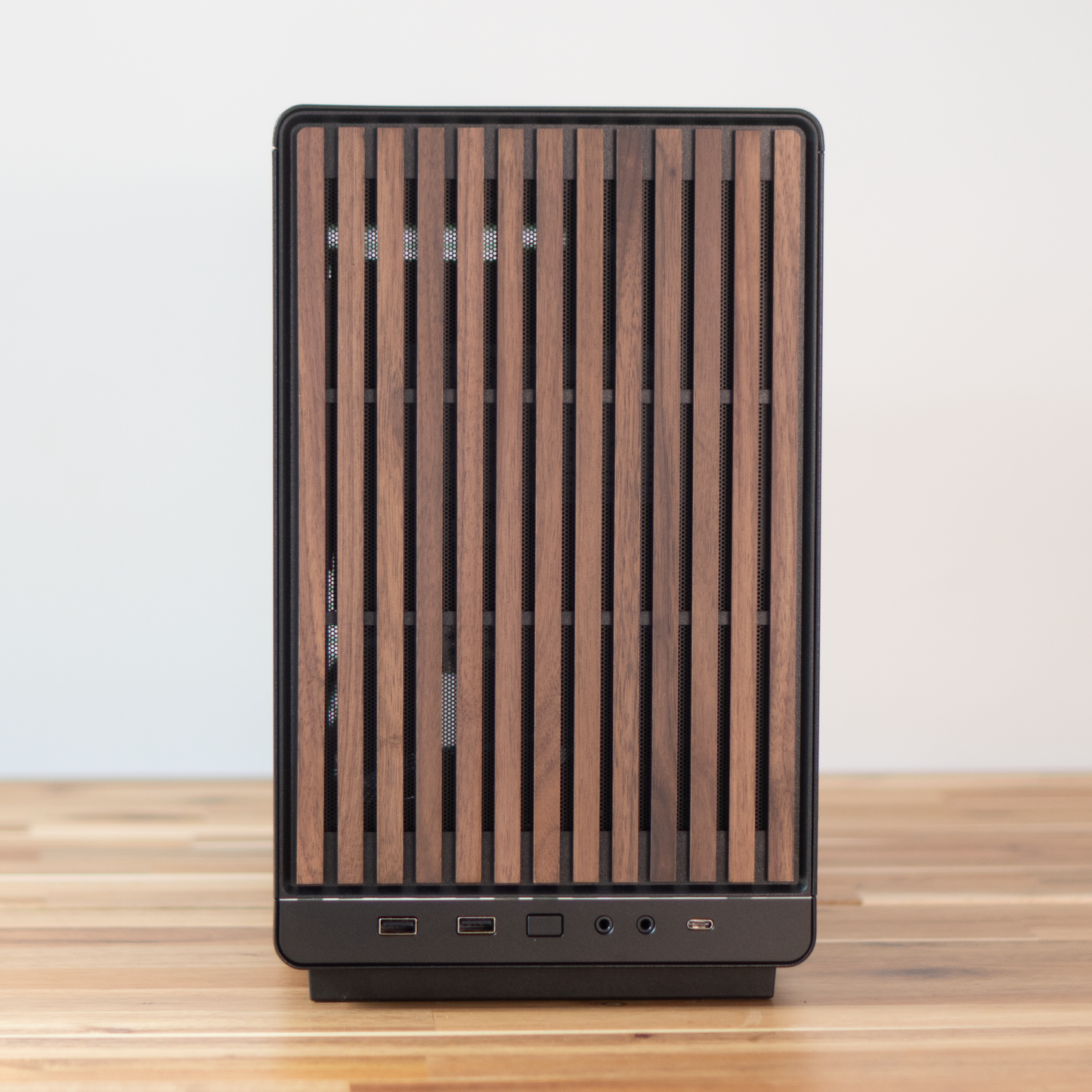
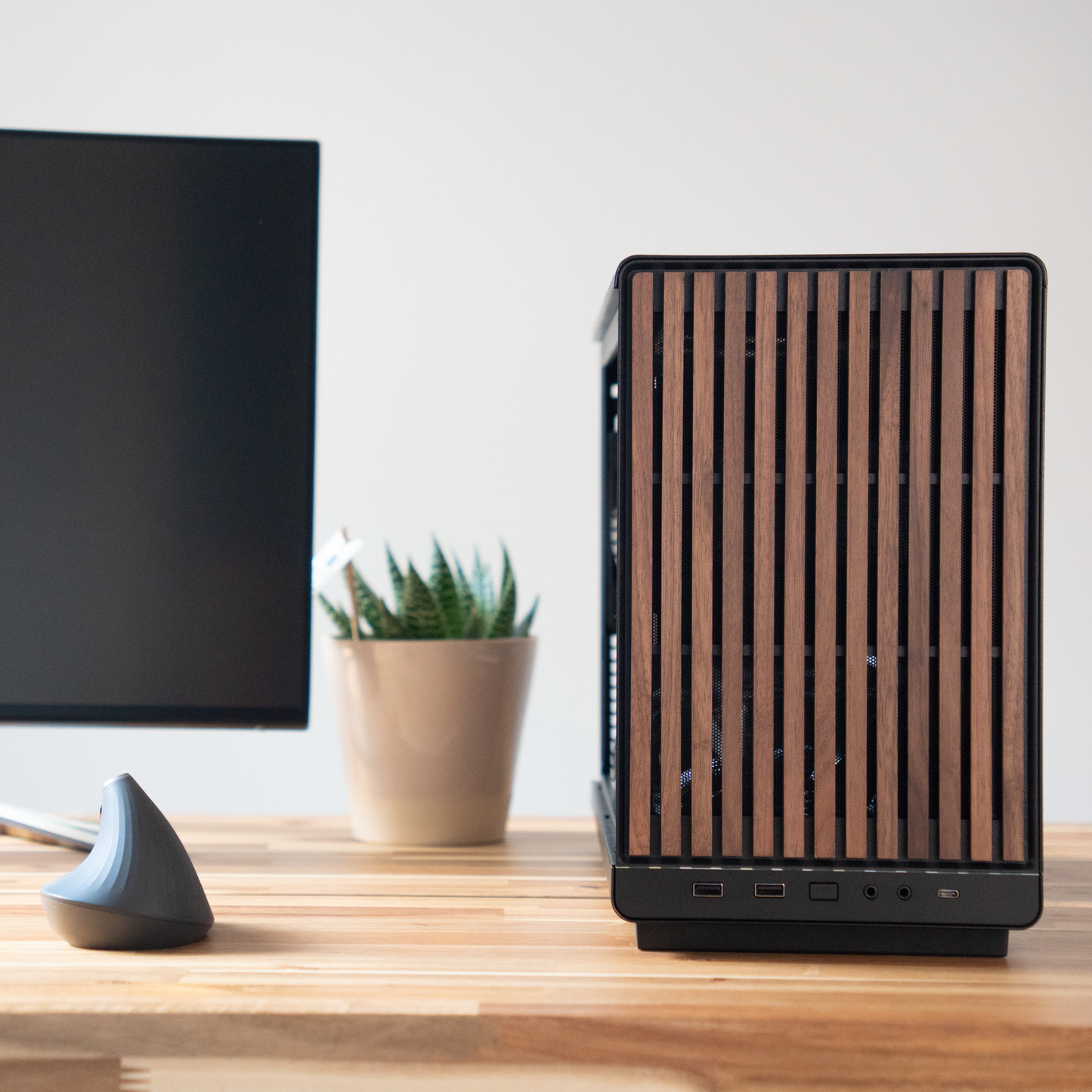
The Lian Li A3-mATX is the reason this build exists. Black, with a walnut front, it looks like a piece of furniture rather than a computer, and it takes a full-height graphics card and a proper tower air cooler without any of the compromises a true mini case forces on you. We fit an 850W Gold supply rather than the smallest unit that would do the job, because the most common upgrade a creator makes two years in is a bigger GPU, and we would rather that be a card swap than a rebuild.
📃 Specifications
-
🧠 CPU: AMD Ryzen 7 5700X
Click or tap for deeper spec info
- 8 cores, 16 threads, Zen 3 architecture, 65W.
- Eight physical cores is the point at which editing software stops feeling like it is queueing. Timeline playback with a few effects layers, background media conching and an export all at once stay separate jobs rather than one traffic jam.
- The 65W design means it holds its boost clocks under a long render without the cooler working hard enough to be heard from across the room.
- This is a mature platform. It is not the fastest chip we sell, but for a machine at this level it is where the money does the most useful work, and the savings went into memory, the power supply and the case.
-
❄️ CPU Cooler: Thermalright Assassin X 120 Refined SE, black single tower air cooler
Click or tap for deeper spec info
- Air, not liquid. There is no pump to fail and nothing to degrade over a five year ownership, which matters more on a machine that will sit at full load for an hour at a time than it does on one used for short bursts.
- A 148mm tower with four 6mm nickel-plated copper heatpipes making direct contact with the processor, drawing heat out through 51 aluminium fins. Rated to 225W.
- The 5700X carries a 65W rating and boosts past it in practice, pulling around 88W with every core loaded. A cooler rated to 225W is a long way clear of that, so during a sustained export the fan sits in the quiet part of its curve instead of ramping up and down.
- The TL-C12C 120mm PWM fan runs to 1550rpm and 66.17 CFM at a rated 25.6 dBA, and spends almost all of its life well below that.
- It does not overhang the memory slots, so the two free ones stay easy to reach if you add capacity later.
- Thermalright's own TF4 paste, applied by hand, and a three year warranty on the cooler itself.
- Plain black, no lighting.
-
🔲 Motherboard: MSI B550M PRO-VDH WiFi (micro-ATX)
Click or tap for deeper spec info
- Full PCIe 4.0 x16 for the graphics card and two M.2 slots, one of which is left free for you.
- Wi-Fi and Bluetooth are on board, so there is no adapter hanging off a rear USB port.
- Power delivery on this board is comfortable for a 65W eight core part. We do not pair boards with processors that will make them run hot.
-
📏 Memory: 32GB (2x16GB) DDR4-3200 CL16
Click or tap for deeper spec info
- For creative work, capacity beats raw frequency almost every time. 32GB is the difference between an editor, a browser full of reference tabs, Photoshop and a design app all staying open, and having to close things to keep working.
- Run as a matched pair in dual channel, with the memory profile enabled in the BIOS before the machine ships.
- Two slots are left free. Going to 64GB later is a straightforward addition if you move to larger After Effects compositions or heavy 3D scenes.
-
💾 Storage: 1TB NVMe PCIe 4.0 SSD (TLC)
Click or tap for deeper spec info
- TLC flash, not the cheaper QLC that slows down badly once it is most of the way full. That matters on a working drive that holds active project files.
- PCIe 4.0 speeds mean importing a card of footage or moving a project folder is limited by whatever you are copying from, not by this drive.
- One drive as standard. Windows, applications and your current project share it. If you would prefer a separate operating system drive with the project files kept apart, that is a live chat conversation and we will spec it around how you work.
- A DRAM-buffered drive is available on this build as an option rather than fitted as standard. Ask if you write large files continuously, for example long-form multicam or high bitrate camera masters.
-
🎮 Graphics: NVIDIA RTX 5060 8GB
Click or tap for deeper spec info
- Chosen for CUDA and for the encoder. Premiere Pro, After Effects, DaVinci Resolve and the generative tools in Photoshop all take the shortest path on NVIDIA hardware, and a lot of creative software is still written that way first.
- Hardware encode and decode including AV1, which is what turns a long export into a short one and lets you scrub H.265 camera footage without building proxies first.
- 8GB of video memory is the honest limit here. It is comfortable for 1080p and most 4K work. Very large 4K node trees in Resolve, 8K sources or heavy local AI models will want more, and if that is your day to day we would point you at a different card before you buy.
-
🧰 Case: Lian Li A3-mATX, black with a walnut front
Click or tap for deeper spec info
- Small enough to sit on the desk next to a monitor rather than under it, without the servicing headaches of a true small form factor build.
- The walnut front is real wood veneer over a ventilated frame. Air comes in around it, so the look does not cost you airflow.
- The mesh side panel is fitted as standard. A tempered glass side panel is available as a quick-add option below and replaces the mesh one.
-
🌬️ Case cooling: 4 x 120mm black fans
Click or tap for deeper spec info
- The A3-mATX ships with no fans at all. All four in this build are ours, chosen and positioned by us rather than inherited from the case.
- Set up as intake and exhaust to move air straight across the graphics card and out, which is the part that gets hot during a long export.
- Fan curves are tuned in the BIOS before dispatch so the machine is quiet at idle and rises gradually under load instead of surging.
- No lighting on any of them.
-
⚡ Power Supply: Montech Century II 850W 80+ Gold, fully modular
Click or tap for deeper spec info
- Far more capacity than this specification needs, deliberately. The fan spends most of its life barely turning, and the unit sits in its most efficient band during a render.
- 850W leaves genuine room for a much larger graphics card later without touching anything else, which is the upgrade most creators actually make.
- Fully modular, so only the cables this build uses are installed. In a case this size that is the difference between tidy airflow and a knot behind the tray.
-
🔌 Cabling: Stock cabling, routed and tied
Click or tap for deeper spec info
- Every cable is cut to route, tied down and kept out of the airflow path. Custom sleeved cable sets are available on request if you are choosing the glass panel.
- 🪟 Operating System: As chosen by you from the listing options
-
🧹 Setup: Clean Windows install, no bloat
Click or tap for deeper spec info
- Fresh Windows, current drivers, BIOS configured and the memory profile enabled. No trial software, no toolbars, nothing we would not want on our own machine.
- Every build is stress tested on CPU, memory and graphics before it is packed, and ships with the test certificate in the box.
-
🛡️ Warranty: 3 years parts and labour, return to base
Click or tap for deeper spec info
- Three years as standard on parts and labour. If something goes wrong you talk to the people who built it, not a call centre script.
🔌 Connectivity & Expansion
- 📶 Networking: Wi-Fi 5, Bluetooth 4.2 and Gigabit Ethernet, all on board
- ⚡ Thunderbolt / USB4: Not available on this platform. External drives and capture devices run over USB rather than Thunderbolt on this build
- 🎮 Graphics slot: PCIe 4.0 x16, full length, occupied by the RTX 5060
- 📁 M.2 slots: Two in total, one occupied by the 1TB drive and one free for a second NVMe later
- 💽 SATA: Supported by the board for 2.5in drives. Mounting space in the A3-mATX is limited, so tell us on live chat if you want SATA storage fitted from new
- 🔌 USB: A mix of USB 2.0 and USB 3.2 Type-A on the rear plus a rear Type-C, with front panel ports on the case. If a specific port count or a specific device matters to your setup, ask on live chat and we will confirm the exact rear panel layout of the board going into your build
🛠️ Popular Upgrades
-
🧠 Ryzen 9 5900X (12 cores, 24 threads) (click/tap to learn more)
Worth it if your exports are the bottleneck in your day rather than your editing. Twelve cores mainly buys you shorter encode times, faster warp stabiliser and noise reduction passes, and headroom for heavier effects stacks. If you mostly cut, grade lightly and export once, the 5700X already covers you and the money is better spent on storage. -
📏 64GB memory (4x16GB) (click/tap to learn more)
The upgrade to make if you work in After Effects with long compositions, run 3D or CAD alongside an editor, or open very large multi-layer Photoshop and Illustrator files. For photo work and straightforward video editing, 32GB is genuinely enough and adding more will not make anything faster. -
💾 Larger or additional NVMe storage (click/tap to learn more)
The most common regret on a creator machine is buying too little storage. If you shoot 4K regularly, a 2TB working drive is the sensible starting point. A second drive is the better answer if you want your operating system and applications kept separate from project files, which also makes reinstalling Windows painless later. Options are in the dropdowns below, or ask us and we will size it around your typical shoot. -
⚙️ DRAM-buffered SSD (click/tap to learn more)
Standard on this build is a fast TLC drive, which is the right choice for most people. A DRAM-buffered drive is worth asking about if you write very large files back to back, for example ingesting long multicam shoots or exporting high bitrate masters, where sustained write speed matters more than peak numbers. Not fitted as standard, so mention it on live chat. -
🧰 Lian Li A3 tempered glass side panel (click/tap to learn more)
Replaces the mesh side panel with glass. Purely a looks decision, and worth knowing that mesh moves marginally more air. If the machine is going on your desk in a client-facing space, the glass and walnut combination is the nicer object. If it is going to run flat out for hours at a time, keep the mesh. -
🔇 Noctua Pure Silence Setup (click/tap to learn more)
Every case fan is replaced with a Noctua fan and the curves are retuned in the BIOS for the quietest usable profile. This is the upgrade to take if you record voiceover, narration or music in the same room as the machine, or if you simply spend eight hours a day next to it. If your machine lives under a desk and you wear headphones, you will not notice the difference. -
🔋 Uninterruptible Power Supply (UPS) (click/tap to learn more)
Keeps the machine running for roughly ten minutes through a power cut, which is enough to save and shut down cleanly. Worth it if you do paid client work, run overnight renders, or live somewhere with an unreliable supply. A lost render is annoying; a corrupted project file on a deadline is worse. -
🎥 Camera and gameplay capture (click/tap to learn more)
If you record talking head video from a camera, capture console footage or run a two machine streaming setup, we can specify and fit the right capture hardware. The choice depends on your resolution, frame rate and whether the source is a camera or a console, so tell us what you are feeding it and we will recommend rather than guess. -
🗄️ NAS for backup and archive (click/tap to learn more)
Internal storage is where you work; a NAS is where finished projects live. Worth planning once your archive outgrows a couple of external drives, or as soon as you are handling footage you cannot reshoot. We can design a setup from simple mirrored backup through to shared storage for more than one editor.
👁️ Transparency Notes
-
This machine ships with a single drive shared by Windows, your applications and your project files (click or tap to read more)
Plenty of people work this way without issue, and 1TB is a workable starting point. That said, keeping the operating system on one drive and project media on another makes reinstalls easier and keeps your working files away from anything Windows does. Ask on live chat and we will price a two drive layout before you order.
-
The RTX 5060 has 8GB of video memory, which sets a real ceiling on the heaviest creative work (click or tap to read more)
For 1080p editing, photo work, design and most 4K timelines it is comfortable. Where you will feel it is very large Resolve node trees, 8K source footage, heavy 3D scenes and locally run AI image or video models. We would rather tell you that now than have you discover it in month three, so if any of those describe your work, talk to us before ordering.
-
AM4 is a mature platform and this build is not a stepping stone to a newer processor generation (click or tap to read more)
Everything here is proven and well supported, which is exactly why we still use it at this level. What it does not offer is a path to future AMD processors, PCIe 5.0 or DDR5 memory. Graphics, storage and memory can all be upgraded in place; the processor can be improved within the Ryzen 5000 range but no further. If a long processor upgrade path is important to you, a newer platform is the better buy and we will happily point you at one.
-
Networking on this board is Wi-Fi 5, Bluetooth 4.2 and Gigabit Ethernet, and there is no Thunderbolt or USB4 (click or tap to read more)
Gigabit is fine for normal file transfer and cloud backup, and Wi-Fi 5 is fine for everything short of moving raw footage over the air. If you move large media libraries to a fast network drive daily, or you rely on Thunderbolt storage and docks you already own, say so before ordering and we will suggest either an add-in network card or a different board.
-
The Lian Li A3-mATX ships with no fans, so the four fitted here are chosen by us (click or tap to read more)
Fan brand and model can vary with what our suppliers have in stock, because we buy them in quantity rather than in kit form. What does not vary is the count, the size, the finish and the fact that none of them have lighting. If you want a specific fan brand fitted, that is a live chat conversation.
-
Where a part is not named as a specific model, the exact brand can change with supply (click or tap to read more)
Fans, thermal paste and cabling are the usual cases. Named components in the specification list above are what you will receive. If we ever had to substitute a named part, we would contact you first rather than quietly ship something different.
-
Photographs on this listing may show a similar build rather than this exact specification (click or tap to read more)
Cases are photographed with whatever was on the bench at the time. Your machine will use the same case, the same colour and the same layout, but internal parts in the pictures may differ from the list above.
🎯 What is this PC best for?
- 1080p video editing with effects and grading, without proxies
- 4K editing on shorter form projects and social content
- Photo editing and large Lightroom or Capture One catalogues
- Graphic design, layout and illustration work
- YouTube production, from ingest through to export
- Streaming and screen recording alongside other work
- Desks where the machine has to be seen as well as used
💬 Need help?
Not sure if this is the right spec for your workflow? Ping us on live chat and we will help you choose the perfect creator PC.
Couldn't load pickup availability
🔒 Secure Shopify checkout 🛡️ Warranty included



Creator PCs
The PC36 Way
⚡Creator PCs
Straight to the point - we make video, we edit photos. We know the specs that work
We've designed our Creator Series to only show the sensible options - crafted for reliability and performance
Not quite the spec you want? Or need to change something that's not in the options? Chat with us via the chat bubble icon
Every system is hand-built in Torquay, UK by PC36 - combining clean design, quiet performance, and exceptional reliability
Creator PCs use similar hardware to gaming PCs, so they will actually game nicely on the side too!
🛠️ Customisation and Upgrades
If there is a change or upgrade you would like to make that can't be done directly from the listing, please contact us and we'll make it happen 😎
🔑 Easy Set-up
PC36 systems are the easiest to own. Simply plug it in, power it on, and use. No fiddling, no setup screens, no driver hunts. We deliver a clean Windows install with the latest drivers pre-installed, so you’re creating straight out of the box.
✅ Testing
Every PC36 system undergoes rigorous stress testing before it leaves our workshop. We push it harder than you ever will — if it fails, we don’t ship it.
100% CPU + RAM + GPU torture tests performed all together for the ultimate stress test
Read our statement on noise profile here: LINK
👁️Transparency
Look out for the 👁️ symbol
Here we tell you important info to ensure you know exactly what you're buying and what alternatives might be available
Creator PCs
Helpful info
How Long Until I Get My PC?
Build time is typically 7-10 days
Shipping time is typically 3 days
Most orders are delivered within 10-14 days. If you need it faster please get in touch
If you pay by bank transfer, we can build your PC faster, knocking 2-3 days off the standard completion time
In rare circumstances where availability is low, there may be a delay - we will contact you if so. Rest assured, your payment is not actually taken until stock is confirmed
Delivery and Packaging
Most PCs are delivered via DPD
Delivery is normally made on weekdays. You can change the delivery day (including weekends) via the tracking number or DPD app
PC36 has a unique triple-secure shipping method:
- The interior of the PC is protected with Instapak
- The PC is placed within the case box with foam inserts
- Then a larger second box is padded. The case box is placed inside this box for additional protection
We include as many of the individual component boxes as we can fit in the package, because it helps you with resale value down the line
Please note shipments cannot be delivered to a "safeplace" nor to a neighbour. They must be received by a resident only
Further shipping policy details here
Trusted Brands
Due to stock variability, it is not always possible to specify the exact model of SSD/Motherboard/Power Supply/Board partner graphics card model in every listing, although they will always fulfil the spec/chipset described on the listing.
PC36 is a premium brand. We will only ever use components that make sense for a long term, stable, and performant system. That said, we are always happy to confirm the exact model we will use via live chat just before you purchase
See our Trusted brand list here
Warranty
PC36 offers a gold-standard 3-year warranty on all PCs
This covers component and assembly faults
It does not cover accidental, liquid, or vandalism damage, nor overclocking.
User error including pirated software or viruses is not covered
Repair/replacement is attempted first, and if unable to/uneconomical a refund may be offered
Returns Policy
Returns are accepted within 14 calendar days of delivery, with the following conditions:
- Buyer bears responsibility for return postage cost (unless faulty), and responsibility for the safety/condition of the parcel on its journey back to us
- All serial numbers are recorded and any discrepancies will void the return
- The PC and packaging must be returned in saleable as new condition. All packaging and accessories must be included in the return or it will be void
- Refunds are sent directly to the payment method used for the order
See the full returns policy here
Payment Methods
We accept:
- Direct bank transfer (add to cart and instructions are given)
- Debit/credit card
- Shop Pay